
From time to time a user may not be able to edit a Drupal node and you end up tearing your hair out trying to figure out why. Sometimes the solution is obvious, and sometimes it is not. This post will take you through some of the main reasons for the problem along with suggested solutions.
The Problem
When viewing a node (page), a user with the correct permissions should see an edit tab at the page. The problem here occurs when the user can not see the edit tab at the top and therefore can not edit the node.
Edit tab visible (as it should be):

Edit tab missing:

Possible causes and solutions
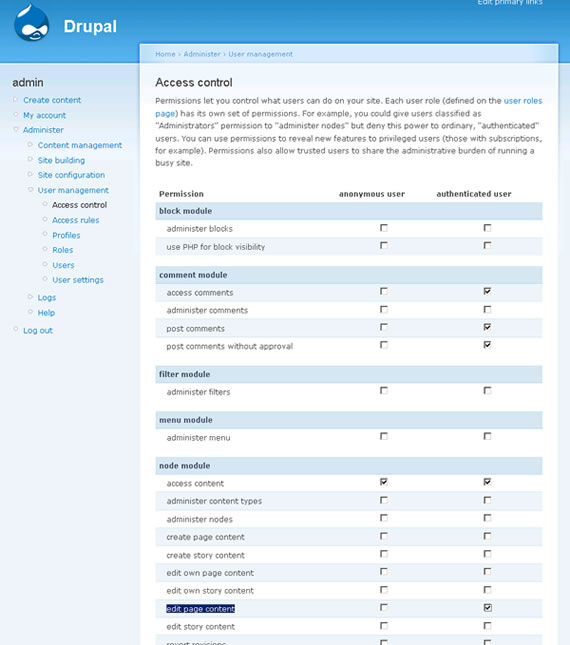
User’s role does not have permission to edit the content type
All users belong to a role, whether you have created roles or not. If you have not created any roles yourself, then users with accounts will be given the “authenticated user” role. The user must have access to edit the relevant type of node.
For example, if you want all authenticated users to be able to edit the page content type, then you need to tick “edit page content” for authenticated users in access control. Access control url: Drupal 5: yoursite.com?q=admin/user/access Drupal 6: yoursite.com?q?q=admin/user/permissions
Node permissions need to be rebuilt
If you are using an access control module (such as Content Access) then from time to time you may need to rebuild the permissions table. You will find a button to do this under “Post settings”. This button will only appear if you are using an access control module.
Post settings -> Rebuild permissions

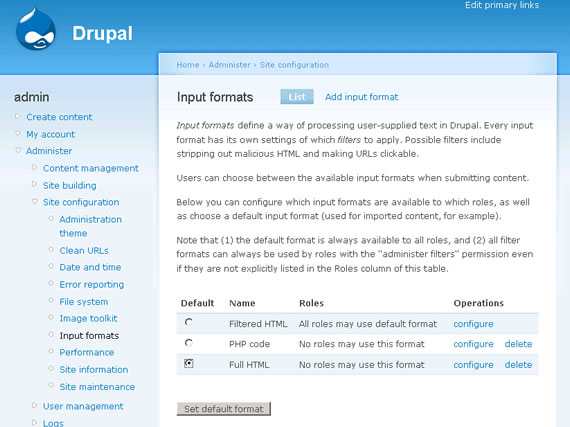
Users role does not have permissions to use the input format
This is a weird one that trips many people up. The user must have permission to use the input format that the node uses. If, for example, the users role does not have access to “Full HTML” but one of the text areas in the node is set to Full HTML, then users who belong to that role will not be able access to edit the node.
No roles are allow to use full html:

But the node body is set to full html:

The easy solution here is allow the user’s role (authenticated user) to use Full HTML, or mark it as the default.
Edit tab is missing
The edit tab maybe missing from your page. Check page.tpl.php in your theme. It should include something like this:
if ($tabs): print $tabs; endif; The variable $tabs contains the view and edit tab. If that is missing, the edit tab will not appear at all.
Edit tab is hiding under title
The edit tab may be hiding under your title. If you have Firebug, you should be able to check to see if the edit tab is there or not. There could be a CSS error causing it to sit under the title.
ADDED 10 Aug 2010 - Permissions
One of the comments below makes another important point regarding permissions. I will test it out and add it properly to this post in due course. In the mean time, take a look at the comment: http://befused.com/drupal/user-edit-node-problem#comment-20969

